
📈 The TORO Insight Update
Your store, in your pocket. Plus CigarLink, 5 new ARM reports, a better touch screen, and the return of two-word coupon codes. This is one of the biggest updates we’ve ever shipped. The headline is TORO Insight — a brand-new app that lets you check on your store from anywhere: your phone, your tablet, your couch. But there’s a lot more: a full CigarLink integration that brings wholesale price tracking and automated pricesheet collection, five new ARM reports (including two requested by TORO stores), a smarter Business Valuation Report, major improvements to the modern touch screen, and a handful of fixes that’ll make your day smoother.📱 TORO Insight — Your Store in Your Pocket
Check on your store from anywhere. No remote desktop. No calling in. Just open the app. This is the feature we’ve been building toward for a long time. TORO Insight is a standalone app that gives store owners a real-time view of what’s happening at their store — right from their phone.TORO Miami Beach
Live
$4,287.50
Today’s Sales • 63 transactions
+12%
vs avg day
+8%
vs last year
$68.05
avg ticket
Sales
Items
Customers
Text
My Store
🎓 Try the Live Demo
Open it up and you’ll see today’s sales total, transaction count, and average ticket — with a comparison to how the same day of the week usually performs. Below that, an hourly breakdown shows you exactly when sales are happening. You can see who’s clocked in right now (and who clocked out already), what tabs are open and how much they’re worth, your top-selling items today, and a breakdown of sales by category, payment method, and channel (takeout vs. staying).
There’s also a top customers view across five time windows (today, this week, this month, this year, all time), your recent transactions with full item details, and an employee directory with contact info.
See TORO Insight in action — no login required
It’s Not Just a Dashboard — It Actually Does Things
TORO Insight isn’t just for looking at numbers. You can run inventory reports by brand or vendor and get back quantity-on-hand data without being at the store. You can build analytic purchase orders — pick a vendor, choose your ordering parameters, and TORO crunches the numbers and shows you what to order. Review the items, adjust quantities, add notes, and either send the order directly through TORO or email it yourself. There’s also group texting — select a membership level or customer tag and send a text to that group. And nightly staged orders that automatically build suggested purchase orders at close of business based on your configured restock parameters, so you wake up to a ready-to-review order every morning. All of this happens through TORO — the app sends requests, your POS processes them, and the results come back to your phone. If TORO is off or paused, requests queue up and get processed when it comes back online.Works on Any Device
TORO Insight is a web app that works like a native app. On your iPhone or Android, just visit the link, tap “Add to Home Screen”, and it installs as a standalone app with the TORO icon. No app store, no downloads, no updates to manage. Each account is tied to one device for security. If you get a new phone, just log in on the new one — the old device is automatically disconnected. You get up to 5 device swaps per year, which is plenty for normal phone upgrades. Want to see it in action? Check out the demo at torocigarpos.com/insightDemo How to set up: Ask your TORO support contact to enable Insight for your store, then create your account from the TORO POS under Help → TORO Insight| 📘 Help Manual | TORO Insight |
| ⚡ Speed | ⭐⭐⭐⭐⭐ |
| 💰 Revenue | ⭐⭐⭐⭐⭐ |
| 🎯 Ease of Use | ⭐⭐⭐⭐⭐ |
🔐 TORO Insight — Password Management & Admin Tools
Stronger security, easier account management, and a cleaner admin experience. Insight accounts now require stronger passwords — at least 10 characters with uppercase, lowercase, a number, and a symbol. The POS checks these rules in real time as you type, so you know exactly what’s needed before you hit Submit. Two new actions make password management painless. Change Password lets any Insight user update their own password from their profile — enter the current password, pick a new one, done. Reset Password lets a manager reset a forgotten password for any employee without needing the old one — available from the Insight User Access screen or from the employee’s own profile. Both actions sign the user out of all devices when they complete, so any compromised session is killed immediately. There’s also a login lockout on the Insight side now (5 failed attempts in 15 minutes) — a manager reset clears the lockout instantly. The Insight User Access screen got a full polish pass: properly contrasted alternating row colors so you can actually read the list, a progress indicator while loading, and a new Create New User button. Click it, pick an employee, and the Insight setup dialog opens for them. If they don’t have Insight Access enabled yet, the POS asks if you want to turn it on and handles it automatically — no more navigating to Employee Settings just to flip one switch. How to access: Help → Setup TORO Insight (for your own password) • EMPLOYEE MENU → Tools → Insight User Access (for managing others)| 📘 Help Manual | TORO Insight |
| ⚡ Speed | ⭐⭐⭐⭐⭐ |
| 💰 Revenue | ⭐⭐ |
| 🎯 Ease of Use | ⭐⭐⭐⭐⭐ |
🔗 CigarLink Integration
Your wholesale pricing just got a watchdog.
| 📘 Help Manual | CigarLink Integration |
| ⚡ Speed | ⭐⭐⭐⭐ |
| 💰 Revenue | ⭐⭐⭐⭐⭐ |
| 🎯 Ease of Use | ⭐⭐⭐⭐ |
📧 CigarLink Pricesheet Outreach
One button. Every rep. Updated pricing. Here’s the dream: you press a button, and every one of your sales reps gets a professional email asking them to reply with their current pricesheet. CigarLink processes the pricesheet, the rep verifies the data, and your store gets automatic cost updates. That’s Pricesheet Outreach. The intro screen walks you through exactly how it works with a step-by-step breakdown and benefit cards. Once you approve, emails go out automatically — and they re-send every week until each rep responds. No need to come back and click again. Companies that have already replied show as green “Received” rows, so you always know where things stand. How to access: EMPLOYEE MENU → CigarLink → Outreach| 📘 Help Manual | CigarLink Integration |
| ⚡ Speed | ⭐⭐⭐⭐⭐ |
| 💰 Revenue | ⭐⭐⭐⭐⭐ |
| 🎯 Ease of Use | ⭐⭐⭐⭐⭐ |
ARM 📈 Advanced Reporting Module — The Biggest ARM Update Yet
4 new reports, automated email delivery, and a whole new way to use your data.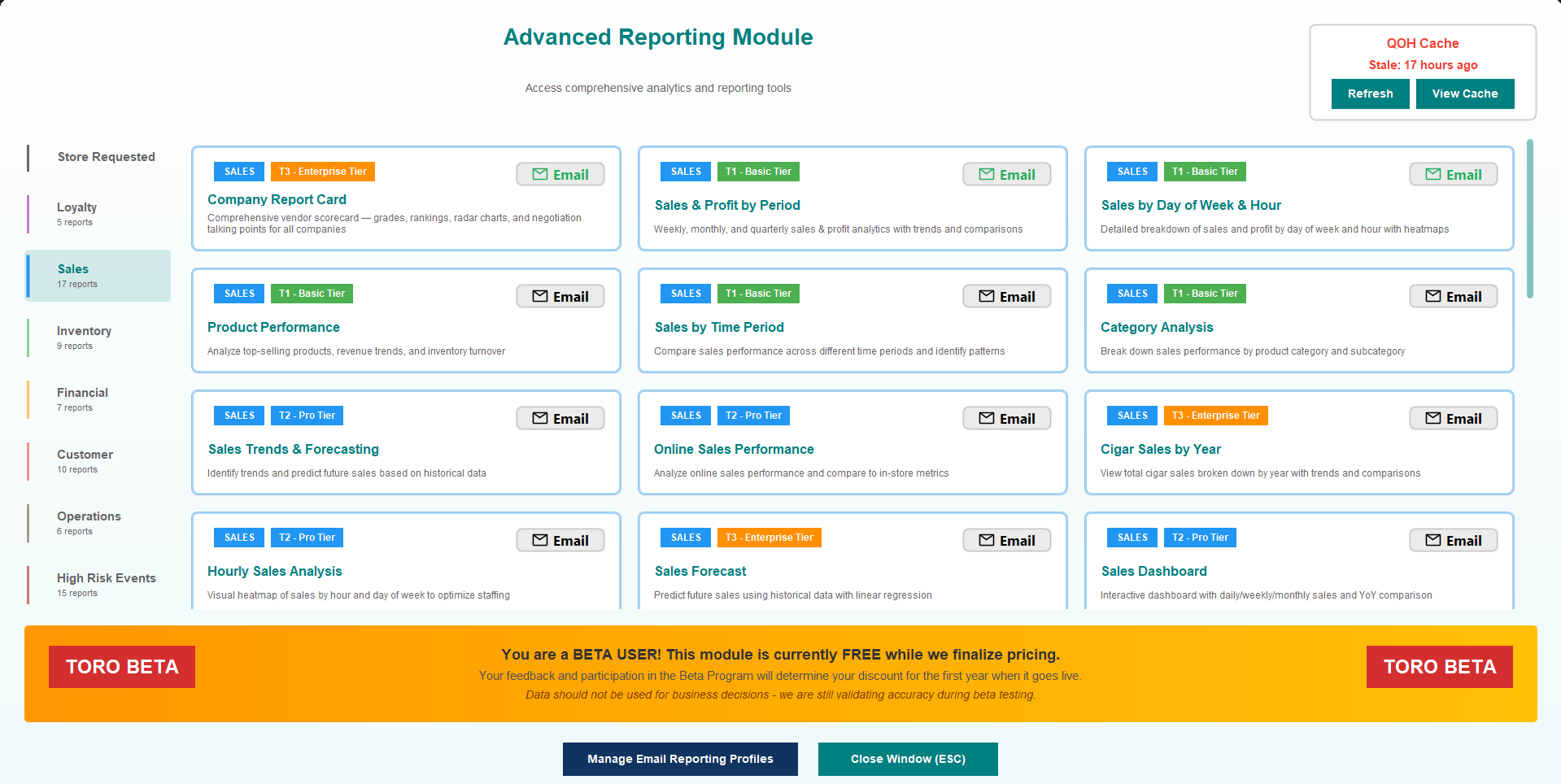
ARM 📊 Company Report Card — Make sure you have this for the PCA!
Walk into your next vendor meeting with receipts — literally. New in Advanced Reporting: the Company Report Card. Pick any company or brand you carry, and TORO builds a full-page scorecard covering six dimensions — sales volume, growth trend, margin performance, inventory efficiency, consistency, and customer reach. Each dimension gets a score, and they all come together in a radar chart that makes strengths and weaknesses immediately obvious. The best part? TORO auto-generates negotiation talking points based on the data. If a brand’s margins are thin but volume is high, it’ll suggest leveraging that volume for better pricing. If growth is declining, it’ll flag it so you know before your rep does. Print the whole thing and bring it to your next tradeshow — the cover page even has your store name and the TORO logo. Browse companies using the sidebar navigation with a built-in search, or generate report cards for your entire portfolio. How to access: DASHBOARD → ADVANCED REPORTING MODULE → Sales → Company Report Card| 📘 Help Manual | Advanced Reporting Module |
| ⚡ Speed | ⭐⭐⭐ |
| 💰 Revenue | ⭐⭐⭐⭐⭐ |
| 🎯 Ease of Use | ⭐⭐⭐⭐ |
ARM 📧 Automated Email Reports
The reports you need, delivered to your inbox on a schedule you set. You can now have TORO automatically email reports to you and your team on a schedule. Create an Email Reporting Profile, add the reports you want included, pick your recipients, and choose how often — daily, weekly, monthly, quarterly, or annually. TORO handles the rest. Each email arrives with a polished, branded layout: a sales snapshot at the top, day-of-week comparisons, category breakdowns shown as visual bars, and your top-selling items and customers. It’s not a raw spreadsheet dump — it’s a report you’ll actually want to read over your morning coffee. Setting it up is flexible. Right-click any report in Advanced Reporting and choose “Add to Email Profile”, or use the Email button on any report card. You can set an anchor date to run reports for a specific day, and smart scheduling makes sure end-of-period reports fire at the right time. If TORO was off when a report was due, it catches up automatically when it starts back up. How to access: DASHBOARD → ADVANCED REPORTING MODULE → Manage Email Reporting Profiles (or right-click any report)| 📘 Help Manual | Advanced Reporting Module |
| ⚡ Speed | ⭐⭐⭐⭐⭐ |
| 💰 Revenue | ⭐⭐⭐⭐ |
| 🎯 Ease of Use | ⭐⭐⭐⭐ |
ARM 📊 Brand & Vendor Period Comparison — 👋 Requested by Heritage Cigars
Pick a company. Pick two time periods. See exactly what changed. The new Brand & Vendor Period Comparison report lets you select a company or brand, choose two time periods, and get an item-by-item breakdown of what’s growing and what’s declining. The setup is simple: a clean two-step dialog walks you through picking your company and then your comparison periods. The results show revenue changes, unit changes, and overall trends with clear visual indicators — green for growth, red for decline. It’s the report you’ll want before every vendor meeting. How to access: DASHBOARD → ADVANCED REPORTING MODULE → Sales → Brand & Vendor Period Comparison| 📘 Help Manual | Advanced Reporting Module |
| ⚡ Speed | ⭐⭐⭐ |
| 💰 Revenue | ⭐⭐⭐⭐⭐ |
| 🎯 Ease of Use | ⭐⭐⭐⭐ |
ARM 👥 Item Customer History — 👋 Requested by Yellowstone Cigar Co.
See every customer who’s ever bought a specific item — and how often. Ever wanted to know who’s been buying a particular item? The new Item Customer History report shows you every customer who’s purchased a specific product, along with how many times they bought it, how many units, and how much they spent. It’s perfect for identifying your best customers for a particular brand, reaching out about new arrivals, or understanding who to notify when something comes back in stock. Pick any item from the item finder, choose your date range, and get the full picture. You can even add this report to an Email Reporting Profile to automatically track a key item’s customer base over time. How to access: DASHBOARD → ADVANCED REPORTING MODULE → Customer → Item Customer History| 📘 Help Manual | Advanced Reporting Module |
| ⚡ Speed | ⭐⭐⭐⭐ |
| 💰 Revenue | ⭐⭐⭐ |
| 🎯 Ease of Use | ⭐⭐⭐⭐⭐ |
ARM 📈 Inventory Valuation Viewer
A quick way to see exactly what your inventory is worth. New in Advanced Reporting: a dedicated viewer that lets you browse all your inventory values with filtering. See what you have, what it’s worth, and drill down by category or brand. It’s a handy companion to the full Inventory Valuation report when you just need a quick answer. How to access: DASHBOARD → ADVANCED REPORTING MODULE → Inventory| 📘 Help Manual | Advanced Reporting Module |
| ⚡ Speed | ⭐⭐⭐ |
| 💰 Revenue | ⭐⭐⭐⭐ |
| 🎯 Ease of Use | ⭐⭐⭐⭐ |
💰 Business Valuation Report — Now Even Smarter
A more complete picture of what your business is actually worth. The Business Valuation Report just got three meaningful upgrades. First, if you sell wholesale, those invoice revenues now count toward your total revenue and profit metrics — no more undervaluing stores that do both retail and wholesale. Second, there’s a new Inventory by Category breakdown that shows exactly how your inventory value is distributed across Cigars, Accessories, Liquor, and everything else. It’s a quick visual gut-check on where your money is sitting. Third, the report now asks about Prepaid Taxes. If you pay excise tax or similar taxes when you purchase inventory (not at the point of sale), TORO calculates that embedded tax and includes it as a recoverable asset in your valuation. It’s a detail most POS systems miss entirely. How to access: DASHBOARD → ADVANCED REPORTING MODULE → Financial → Business Valuation| 📘 Help Manual | Advanced Reporting Module |
| ⚡ Speed | ⭐⭐⭐ |
| 💰 Revenue | ⭐⭐⭐⭐⭐ |
| 🎯 Ease of Use | ⭐⭐⭐⭐ |
🛒 Online Store Sync Tool V3
The tool that connects your store to the web just got rebuilt from the ground up. The Online Store Sync Tool has been completely redesigned. The new version features a modern layout with real-time status cards showing order counts, sync progress, and what’s currently happening. Order management is cleaner and more reliable, with improved downloading and better handling of edge cases that used to cause sync hiccups. Whether you’re pulling in online orders or pushing inventory updates to your website, the new sync tool is faster, more informative, and much more pleasant to use. How to access: ONLINE STORE → SYNC TOOL| 📘 Help Manual | Your Online Store |
| ⚡ Speed | ⭐⭐⭐⭐ |
| 💰 Revenue | ⭐⭐⭐ |
| 🎯 Ease of Use | ⭐⭐⭐⭐⭐ |
💳 Modern Payment Screen
Charging a card just got cleaner and faster. The payment charge screen has been completely reworked with the modern TORO design. When you’re processing a payment, the new layout is cleaner, the buttons are bigger for touch, and the flow from selecting a payment method to completing the charge is smoother. It’s one of those things you use dozens of times a day, so even a small improvement adds up. How to access: Automatic — appears when processing any payment| 📘 Help Manual | Taking Payment |
| ⚡ Speed | ⭐⭐⭐⭐⭐ |
| 💰 Revenue | ⭐ |
| 🎯 Ease of Use | ⭐⭐⭐⭐⭐ |
📨 Modern Purchase Order Emails
Your vendors are going to think you upgraded your whole operation. Purchase order emails got the full TORO branding treatment. When you email a PO to a vendor, it now arrives with a professional, polished layout — clean header, organized item table, and your store’s branding throughout. It’s the kind of email that makes vendors take you seriously. How to access: INVENTORY → PURCHASE ORDERS → select a PO → EMAIL| 📘 Help Manual | Creating a Purchase Order |
| ⚡ Speed | ⭐⭐⭐⭐ |
| 💰 Revenue | ⭐⭐ |
| 🎯 Ease of Use | ⭐⭐⭐⭐⭐ |
🎫 Modern Touch Screen — Transaction List Upgrades
The items you ring up now show you a lot more without any extra clicks. The modern touch screen’s transaction list got a serious glow-up. When you ring up a box, it now shows “1” with the box price instead of “20” at the stick price — the packaging type (e.g., “Box of 20”) is displayed right under the quantity buttons and next to the price. Discounts are now visible on every line item. You’ll see the percentage and dollar amount in red next to the price, with the original total crossed out and the discounted total below it. No more wondering “did I apply that discount?” Right-click any item for a popup menu with Remove Item, Change Quantity, Change SKU, Discount, View Details, and more — the same options as the legacy screen, now right where you need them. You can also select multiple items (Ctrl+click or Shift+click) to discount or remove them all at once. How to access: Automatic — visible on the modern touch screen layout| 📘 Help Manual | Running Your First Sale |
| ⚡ Speed | ⭐⭐⭐⭐⭐ |
| 💰 Revenue | ⭐⭐ |
| 🎯 Ease of Use | ⭐⭐⭐⭐⭐ |
🎲 Configurable Coupon Code Format
The two-word coupon codes are back from the dead. Back by popular demand, you can now choose how your coupon codes look. Pick from three styles:- Word + Numbers (e.g., PIE713) — the current default
- All Numbers (e.g., 847-291) — clean and simple
- Two Words (e.g., PIE-SKY) — the OG classic
| 📘 Help Manual | Managing Customer Rewards |
| ⚡ Speed | ⭐⭐⭐⭐⭐ |
| 💰 Revenue | ⭐⭐ |
| 🎯 Ease of Use | ⭐⭐⭐⭐⭐ |
❔ Quick Help Button
Help is now one click away on every modern window. Modern-styled windows now have a “?” button in the header bar. Click it for quick access to Help, Report an Issue, Lock Screen, and access settings — without needing the old menu bar. It’s a small addition that makes a big difference when you’re training new employees or just need a quick answer. How to access: Automatic — visible in the header of all modern TORO dialogs| 📘 Help Manual | Welcome to TORO |
| ⚡ Speed | ⭐⭐⭐⭐⭐ |
| 💰 Revenue | ⭐ |
| 🎯 Ease of Use | ⭐⭐⭐⭐⭐ |
🛠 Under the Hood
- Sidebar Menus Fixed: The sidebar menus no longer vanish unexpectedly — they stay visible until you close them.
- Online Store Image Sync: Removing an image from an item now correctly removes it from your online store too, instead of leaving orphaned photos on your website.
- Updater Checkmarks: The update screen now correctly shows checkmarks next to completed steps instead of leaving them blank.
- Dialog Close Button: The X button on dialog windows now works reliably across all screens.
- Inventory Freshness: Inventory counts now always use the most recent data available, eliminating occasional staleness issues.
- Reporting Reliability: All 68 reports in Advanced Reporting now follow a consistent structure, making them more reliable and easier to maintain going forward.
- Visual Components Upgraded: Buttons, panels, and tables throughout the app have been polished for a more consistent modern look.
- Module Subscription Improvements: The module signup and subscription management flow has been streamlined for a smoother experience.
- Event Day-of-Week Fix: Event day-of-week average sales were showing stale data — now they update properly every day.
- ID Scanner Fix: Scanning an ID on the modern touch screen no longer accidentally triggers “Obtain From Account” instead of reading the barcode.
- Birthday Coupon Fix: Birthday coupons could be sent on the wrong day due to a leap year calculation issue — now fixed.
- Employee Selection Dialog: Fixed several issues — “Clocked In Today” no longer crashes, employees load immediately when the dialog opens, the “Active Only” toggle works correctly, and changing the store dropdown refreshes the list.
- Smarter VOIP Detection: When a phone number is detected as VOIP (not a regular cell number), the SMS subscribe screen now shows a clear explanation instead of a vague error message.
- Employee Picker Modernized: The “Select Employee” dialog used by payroll, tips, salary setup, and several other features now matches the rest of the TORO look — teal header, alternating row colors, double-click to confirm.
- Insight Sync Status Readability: The Insight Sync Status screen now has properly contrasted row colors and a progress dialog while loading, consistent with the rest of the Insight admin tools.
- Insight Signup Improvements: The Insight data feed now starts pushing immediately after signup (no restart needed), the setup dialog no longer gets hidden behind the main POS window, and passwords are no longer echoed back in the confirmation screen.
- Online Store Authentication: The Online Store tab now properly requires password authentication on the modern layout.
- Store Review Approvals: You can now approve star ratings separately from review text, edit review content before publishing, and mark reviews as ignored. Closing the admin screen prompts to publish changes automatically.
🔗 Additional Information
- TORO Insight Demo — See TORO Insight in action with a live interactive demo
UPDATED ON: April 13, 2026 4:40:39 PM
